Project Introduction
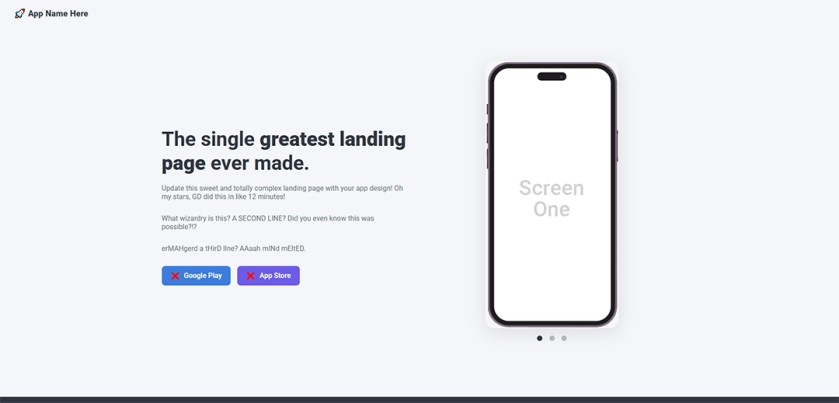
You’ve inherited a totally “functional” landing page… emphasis on the quotation marks. Your job? Rescue it. You’re going to update a broken and unfinished App Download Landing Page using good ol’ HTML and CSS. You’ll be handed a zip folder of files, and then it’s up to you to clean it up, make it look legit, and brand it like it’s the next big app in the App Store. You’ll fix bugs, design new graphics, rewrite boring text, and maybe even curse at the mobile layout a few times (gently). Don’t worry—it builds character.
Creative Focus
This project is all about treating a website like a real-world client handoff. You’re not starting from scratch—you’re stepping into someone else’s mess and making it beautiful. Your job is to think like a creative director: what kind of app is this? What kind of user would download it? How do the visuals, colors, fonts, and layout support that story? You’ll get to create a fictional app identity, build a mini branding system, and redesign elements that visually sell your app to the world. You’ll also need to think about layout logic, mobile responsiveness, and simple interactivity—all the things that turn a flat site into a polished experience.
Project Requirements
Your final submission must be published as a Portfolio Post on your WordPress site and include the following:
- Submit your project files zipped, and publish a full write-up with screenshots on your WordPress portfolio.
- The ZIP file must be downloadable from your Google Drive or your WordPress.
- You should create a final Mockup to showcase your final design for your Portfolio.
- Use this zip folder as your project base. Good luck!
- Replace the logo with a fictional one that you design.
- Update the main header and three subheadings with marketing-friendly, on-brand language.
- Link both call-to-action buttons to working URLs (you can use any live link you wish, so long as it works).
- Replace both button icons with better ones (SVG or PNG).
- Create and insert three new “app screen” graphics using your own original mockups (Photoshop and/or Illustrator).
- Fix the broken mobile layout so the phone slider moves above the text like it should.
- Remove the vertical scrollbar and ensure the layout is clean in all viewports. The footer should be fully visible without a scroll bar.
- Update the copyright in the footer to reflect this current year and your fictional app/company name.
- Add a cool background that looks good for the app design you made.
- Your final submission on your WordPress Portfolio must:
- 150-250 word description of the project score, and how you overcame the client & website issues.
- A professional featured image.
- Proper Title, Tags and Categories for your WordPress Portfolio
- Download button to download your finished ZIP folder (hosted via Google Drive).
Project Grading Rubric
Here is how your project will be graded.
| Criteria | Description | Points |
|---|---|---|
| Responsive Website Fixed | No vertical or horizontal scroll bar, mobile layout working properly. | 20 pts |
| Creative Designs | Logo, App Screens and background graphics are clean and professional. | 20 pts |
| Complete & Correct ZIP | Your downloadable ZIP folder has all the required files to work fully on a different computer without broken images, links, etc. | 20 pts |
| Working HTML | The buttons have working hyperlinks and proper icons. | 15 pts |
| Portfolio Presentation | Your post has all the required elements (mockup, download button for zip, project description, etc.). | 15 pts |
| Effort & Execution | Work shows care, revision, and thoughtful design decisions. | 10 pts |
| Total | 100 pts |
OCP & Standard Alignments
13.05 – Create webpages for publication… this project simulates a real-world workflow by having students update and deploy a working landing page.
13.09 – Create and insert buttons into a webpage and test for accuracy… since students must replace button graphics, link them correctly, and check function.
13.08 – Create and edit images and photographs for webpages using digital imaging software… because original app screen graphics must be created and implemented.
13.06 – Apply style sheets for consistent website design… as students will modify and improve the existing CSS to update layout and branding.
12.04 – Demonstrate compliance with ADA recommendations for all websites created… by ensuring button contrast, readable text, and mobile responsiveness are met.
04.03 – Create a digital portfolio to showcase multimedia projects (project must be embedded in WordPress site) … because the final write-up, screenshots, and reflections must be posted as a polished WordPress project.
 Digital Media & Multimedia Design