CTEv25 • Gmetrix Practice Tests: Assignment Guidelines • Category: Tests & Quizzes

Project Introduction
Each time you need to take a Practice Tests, navigate your way through Gmetrix to find the correct test. The Instructor can show you how to find them if you don’t know where they are the first time. Close the related Adobe software (make sure the software isn’t running before you start the test) and click Start. Check the name of the test to make sure you are doing the right one!

You will eventually get this popup (shown below). Check the “Always allow…” box before you hit Open GMetrix SMSe, otherwise you are going to have to do this each and every time you take a practice test.
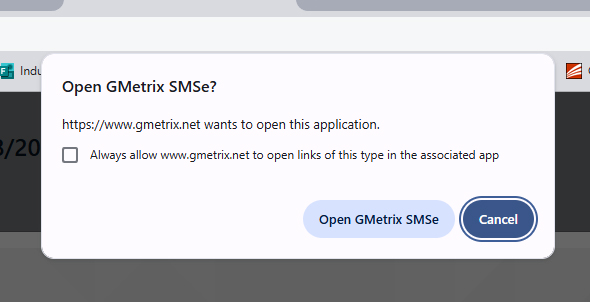
The SMSe will launch the software for you, and you can start your test. Good luck!
Example Screenshot
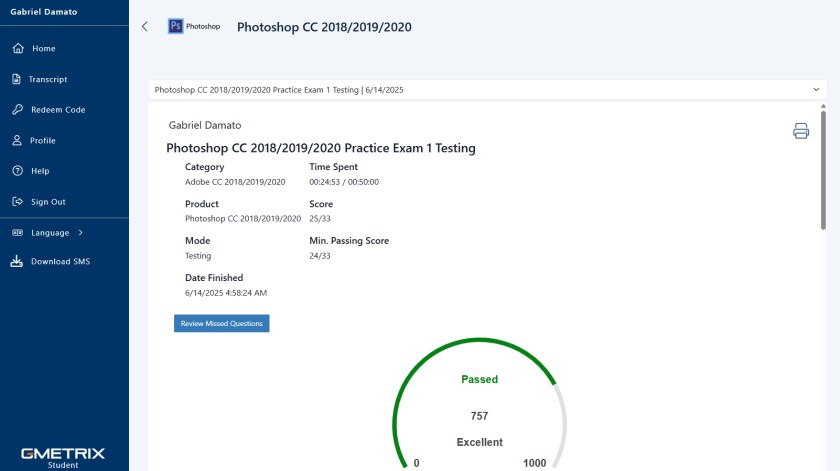
Here I have a screenshot of my Photoshop CC 2018/2019/2020 Practice Exam 1. This is what you will need to send in for a grade when you are assigned a Gmetrix Practice Test. The screenshot needs to include your name on the top left (to prove it really is you) and have the score visible (mine was an 757 because I rushed it, you will most likely get a better score if you take your time). You will need to send this screenshot to the Instructor for your grade. We hope that by now you know how to take a screenshot… right?!
Technical Focus
These Practice Test assignments train you on the exact tools and workflows that show up on Adobe’s certification exams. You can retake these tests as many times as you need to get a good score, but anything over 700 is a passing test. The Post-Assessment score you earn = the score you get in the gradebook (unless you retake it and raise it — which you totally should). In this case, my grade in the gradebook would be 76% (I’m a nice teacher, so I will round up).
Project Requirements
To complete this assignment:
- Follow the instructions to access the assigned Gmetrix Practice Test
- Take the Practice Test
- Take a screenshot of the results showing your name and your final score (re-take it if you got a bad score…)
- Save your screenshot as a JPG file
- Attach it to your weekly turn-in email
Optional but smart: Review and retake the Post-Assessment if your first score isn’t great. We want you over 700 on each of these practice tests.
Project Grading Rubric
You will get the exact score you get on the Gmetrix Practice Test screenshot you submit. Based on the screenshot above, I would receive 76/100 points for this assignment. Please note, you absolutely can review and retake these tests, but you will need to submit your best score by the deadline.
OCP & Standard Alignment
These projects are focused on performance-based assessments, preparing students for certification in Photoshop, Illustrator, InDesign, etc. The standards chosen emphasize technical proficiency, assessment readiness, and workflow mastery, regardless of specific software.
08.02 – Apply job readiness, career planning, and job seeking skills to meet personal and professional goals. (Taking certification tests prepares students for real-world credentialing, portfolio building, and long-term career strategy.)
05.01 – Demonstrate proficiency in advanced design. (Practice tests require students to show not just understanding, but application of design principles, layout, editing, and project assembly — all under pressure.)
04.07 – Demonstrate knowledge of photo editing software. (Whether testing in Photoshop or another tool, all tests emphasize manipulation, layer management, and professional image workflows.)
05.09 – Demonstrate knowledge of design layout software. (For InDesign or similar tests, students are assessed on technical precision, layout skills, and prepress formatting — essential professional practices.)
01.03 – Demonstrate best practices of computer safety and ergonomics. (Students must manage time-on-task, posture, and screen use effectively during multi-hour testing sessions — reinforcing soft skills and professional habits.)
 Digital Media & Multimedia Design