CTEv25 • LearnKey: Assignment Guidelines • Category: Video
Project Introduction
This one’s simple: LearnKey breaks Adobe software into “Domains” — and each one has a Post-Assessment you need to complete. These quizzes help prep you for the Adobe Certification exams, and yes, they’re important. Each time you complete a domain, you’ll take the Post-Assessment and send a screenshot of your score for grading.
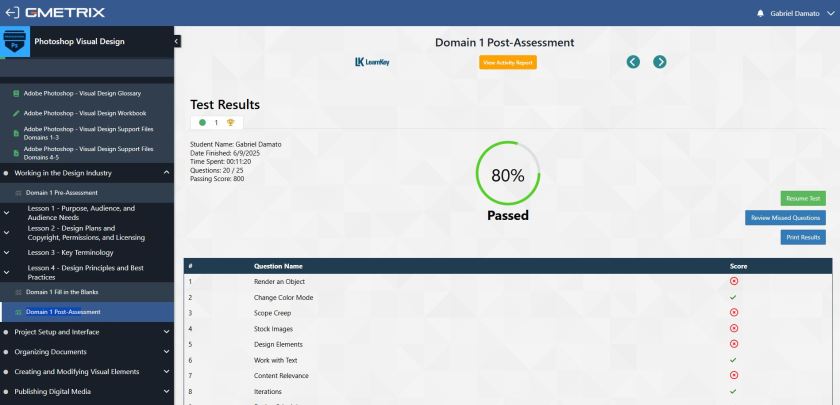
No, GMetrix doesn’t make this easy (shocker), so you’ll use your digital media superpowers to take a proper screenshot, save it, and send it in. Your screenshot must show your name in the top right corner and your score clearly visible. This is how you get credit. That’s it.
Also, yes — this is technically a video-based project, because the instruction is delivered entirely through LearnKey video modules. So this will be added to your Video Category for gradebook weights.
Example Screenshot
Here I have a screenshot of my Photoshop Domain 1 Post-Assessment. This is what you will need to send in for a grade when you are assigned a LearnKey domain. The screenshot needs to include your name on the top right (to prove it really is you) and have the score visible (mine was an 80% because I rushed it, you should do better).
Technical Focus
These LearnKey assignments train you on the exact tools and workflows that show up on Adobe’s certification exams. Watching isn’t enough — you’re expected to absorb, apply, and test your knowledge through these quizzes. The Post-Assessment score you earn = the score you get in the gradebook (unless you retake it and raise it — which you totally should).
Project Requirements
To complete this assignment:
- Watch the assigned LearnKey video lessons for the Domain
- Take the Post-Assessment for that Domain
- Take a screenshot showing your name (top right) and your final score
- Save your screenshot as a JPG file
- Attach it to your weekly turn-in email or submit via the designated digital drop
Optional but smart: Review and retake the Post-Assessment if your first score isn’t great. We want you hitting 100%.
Project Grading Rubric
You will get the exact score you get on the Post-Assessment screenshot you submit. Based on the screenshot above, I would receive 80/100 points for this assignment. Please note, you absolutely can review and retake the Post-Assessment to get your score to 100% (and I suggest you do).
OCP & Standard Alignment
(Watching videos, completing domain modules, and submitting post-assessment screenshots) These are general-purpose Adobe training activities across Photoshop, Illustrator, InDesign, etc., and are focused on structured learning, retention, and digital media literacy — not software specificity. The standards below are selected for how they support self-paced digital learning and industry certification prep.
08.01 – Create and publish a digital portfolio to showcase design and multimedia work. (Students use LearnKey to build technical understanding that supports future projects which will be embedded in their professional portfolio, reinforcing the role of continual learning in portfolio development.)
01.01 – Demonstrate knowledge of basic computer operations. (Students must navigate cloud platforms, media players, LMS tools, and file systems to access LearnKey content, troubleshoot playback issues, and submit proof of completion.)
07.01 – Demonstrate knowledge of the roles and responsibilities of a multimedia production team. (LearnKey domains often explain creative team roles, workflows, and career context as part of the video content, helping students understand how the software fits into real job scenarios.)
08.02 – Apply job readiness, career planning, and job seeking skills to meet personal and professional goals. (LearnKey is built around the Adobe certification pathway, which is an industry-recognized credential supporting career advancement and college/employer readiness.)
06.01 – Demonstrate understanding of pre-flighting and preparing digital content. (Many domain lessons include steps for planning, checking, and finalizing creative assets across different media, tying directly into professional production workflows.)
 Digital Media & Multimedia Design