Project Introduction
This is an optional extra credit challenge for students who want to push their Illustrator skills and earn up to 25 percent extra credit on a related assignment. Your task is to design a custom map of McFatter Technical College using a cool new style that you choose, inspired by the kind of clean, stylized maps you see for campuses, malls, museums, and theme parks. You can have a LOT of fun with this if you want and chase a cartoon style, or keep it sleek and clean, or even do an isometric design… it’s up to you!
Who knows, maybe one of you will dare to take on the dreaded “fantasy” map style one of these days! I am not going to provide images as examples for this one, because I don’t want you to feel creatively limited by my examples. Get out there and look at cool ways to create maps, and get to work!
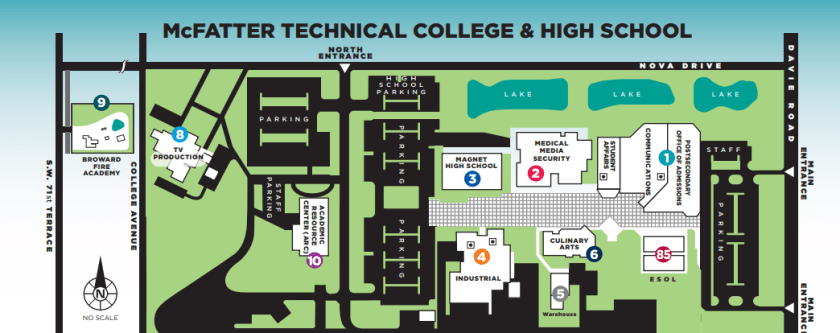
Please check the link to the current campus map. Your mission is simple: do better. Cleaner design. Better readability. Smarter layout. More personality. This project rewards effort, polish, and creative problem solving, not speed. Use the map available online to create something new and in a theme that brings some personality to our beloved campus.
Creative & Technical Focus
Good maps are not just accurate, they are designed. They guide people visually, reduce confusion, and make a space feel intentional. Designers working in wayfinding, UX, branding, and environmental graphics create maps like this all the time for real clients.
You are strongly encouraged to research campus maps, mall directories, and illustrated location maps created by professional designers. Look at how they simplify buildings, use icons, color coding, labels, and hierarchy to make large spaces understandable at a glance.
This project is about pushing Illustrator fundamentals such as shape construction, clean paths, color systems, typography, and layout discipline. The more thoughtful and polished your map, the more extra credit you earn.
This map must represent McFatter Technical College. Accuracy matters, but visual clarity matters more. You are redesigning the campus for communication and usability, not copying the existing map one to one. Simplify where needed and stylize intentionally.
Project Requirements
- Final Deliverable:
- One custom illustrated map of McFatter Technical College
- Created entirely in Adobe Illustrator
- All artwork must be vector based
- Export for portfolio display as JPG or PNG
- WordPress Portfolio Requirements:
- Embed the final map in your portfolio post
- Include at least 1 Project Type.
- Add 5–10 Tags (examples: campus map, Illustrator, vector design, flat map, isometric, wayfinding, portfolio project)
- Create a unique Featured Image based on your map
- Write a project explanation (250–350 words) that covers:
- Your design approach and style selection
- What you improved over the original campus map
- Illustrator tools you used most
- Challenges you solved during the design
Project Grading Rubric
| Criteria | Description | Points |
|---|---|---|
| WordPress Portfolio Post | Intro, unique title, tags, featured image, clean layout, and embedded final map | +5% |
| Map Design Quality | Map is clear, readable, visually appealing, and thoughtfully stylized | +5% |
| Illustrator Technique | Strong use of vector tools such as Shape Builder, Pen Tool, layers, and alignment | +5% |
| Image Visual Clarity & Polish | Final export is clean, balanced, and easy to understand | +5% |
| Effort & Execution | Shows patience, attention to detail, and effort beyond a quick design | +5% |
| Total (possible) | 25% Extra Credit |
OCP & Standard Alignments
05.04 – Create formal or informal design layouts using guidelines, colors, fonts, graphics, and logos, because map design relies on clear layout structure and intentional visual hierarchy.
09.03 – Demonstrate understanding of the illustration software workspace and navigation, because efficient panel and layer use is required to manage a complex map design.
09.04 – Demonstrate use of drawing tools to create, combine, and edit basic shapes, because buildings and pathways must be constructed cleanly using vector tools.
09.05 – Demonstrate the ability to transform content such as scale, rotation, and position, because map elements must be adjusted precisely for clarity and consistency.
09.09 – Demonstrate use of layers by creating, locking, viewing, and organizing artwork, because organized files are essential when designing detailed multi element maps.
 Digital Media & Multimedia Design