Digital Media & Multimedia Design

at McFatter Technical College | Gabriel D'Amato

Menu

Skip to content
  • About Course ▼
    • Meet the Instructor
    • Gradebook Categories & Weights
    • Classroom AI Usage Policy
    • Required Equipment, Software & Book List
    • Suggested Equipment
  • Quick Links ▼
    • Focus Gradebook
    • LinkedIn Learning
    • Microsoft TEAMS
    • Project Design Briefs
  • Adobe ▼
    • Adobe Certification FAQ
    • Certiport
    • Gmetrix
    • Adobe CC Signup Form
  • How to… ▼
    • … turn in Video Assignments.
    • … turn in LearnKey Assignments.
    • …embed Google Slides.
    • …embed a Google video.
    • …write WordPress Posts.
  • Extras ▼
    • Design Practice Games
    • Photo Skills Challenge
    • Mobile App Design Challenge
  • Course Sections ▼
    • OCP-A: Theory & Foundations of Design
    • OCP-B: Multimedia Digital Designer
    • OCP-C: Multimedia Web Interactive Desinger
    • OCP-D: Multimedia Integrated Producer Designer
  • [PS] Course Sections ▼
    • [PS] OCP-A: The Theory & Foundations of Design v25
    • [PS] OCP-B: Digital Multimedia Designer v25
    • [PS] OCP-C: Multimedia Web Interactive Designer v25
    • [PS] OCP-D: Multimedia Integrated Producer Designer v25

Required Equipment, Software & Book List

As a Postsecondary Student who desires to enter the Multimedia Design field, there are some pieces of equipment that I strongly suggest you own for yourself.

If you are serious about becoming a Multimedia Artist or entering the field of Graphic Design, Video Editing, Digital Photography or all of them, you will really want to invest in yourself with a few key things. I have made a list of which things you should think about getting on the Equipment Suggestions page.

Required equipment on this page is just that… required. If you don’t have these items, you cannot possibly work in this field with any success. CTE Students are required to provide the items listed below, within the first week of class.

Adobe Creative Cloud Subscription

Great news! As a student of Digital Media & Multimedia Design here at McFatter, we can actually provide you with an Adobe Creative Cloud Student Account! All you have to do is request an account from your Instructor once you are enrolled! How cool is that? You can absolutely pay for your own account, if you wish (or already have one).
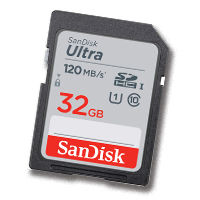

SD Card (NOT a Micro SD Card)

The student will be required to provide their own SD Card(s) to use with classroom computers and cameras. At a minimum, your SD card should be 16g of storage space, though I suggest having at least a few 32g. The brand of the card is up to you, but I have had great results buying SanDisk products.


USB 3.0 SD Card Reader

A good Multimedia Artist is prepared for anything. Most PCs nowadays don’t have SD Card Readers built in… so how are you going to get your photos and videos off the card? I suggest you buy a card reader that is a single unit, rather than one that has wires or cords, they are more durable and will last you much longer.


USB 3.0 Flash Drive

You will need at least a 32gb USB Flash Drive, in order to quickly move small files from computer to computer, or to be able to turn in certain projects to the Instructor. The total storage of the flash drive is up to you, but I suggest you have at least 64gb. Luckily, modern storage is dirt cheap in this format!


USB 3.0 External Hard Drive

The external hard drive is where you will store all of your own artwork, downloads, fonts, files and whatever else you need for the course. The size & brand of the drive is up to you, but I suggest at least 1T or 2T of storage, and have always had great experiences with Western Digital external drives.


The Non-Designers Design Book (4e)

This book is required in the second week of class, and therefore must be purchased BEFORE you start the course (or right away after you register). It is available in the McFatter Campus Bookstore, as well as online in digital formats such as eBooks and PDFs. I would suggest that you own a digital copy, but that is just me.

Widgets

Recent Ramblings & Articles

  • The Not-So-Serious Survival Guide to Typography
  • Three great sites to help you with pairing your fonts!
  • New Student Form
  • Sample Blog Post
  • Great Slide Deck & Presentation Sites

The School Board of Broward County, Florida, prohibits any policy or procedure which results in discrimination on the basis of age, color, disability, gender identity, gender expression, genetic information, marital status, national origin, race, religion, sex or sexual orientation. The School Board also provides equal access to the Boy Scouts and other designated youth groups. Individuals who wish to file a discrimination and/or harassment complaint may call the Director, Equal Educational Opportunities/ADA Compliance Department & District’s Equity Coordinator/Title IX Coordinator at 754-321-2150 or Teletype Machine (TTY) 754-321-2158.

Individuals with disabilities requesting accommodations under the Americans with Disabilities Act Amendments Act of 2008, (ADAAA) may call Equal Educational Opportunities/ADA Compliance Department at 754-321-2150 or Teletype Machine (TTY) 754-321-2158.

Classroom Hours & Info

6500 Nova Drive
Davie, Florida 33317
PS Class Hours
8AM - 11:30AM (Class)
12PM - 2:30PM (Online)

HS Class Hours
1PM - 4PM

Instructor Email gabriel.damato@browardschools.com for questions regarding this program. For information and registration dates, please contact the Communications Department Counselor at 754-321-5700
Create a website or blog at WordPress.com
  • Subscribe Subscribed
    • Digital Media & Multimedia Design
    • Join 26 other subscribers
    • Already have a WordPress.com account? Log in now.
    • Digital Media & Multimedia Design
    • Subscribe Subscribed
    • Sign up
    • Log in
    • Copy shortlink
    • Report this content
    • View post in Reader
    • Manage subscriptions
    • Collapse this bar